
Project
Quicksearch@Reuther
Client
Walter P. Reuther Library, Archives of Labor and Urban Affairs,
Wayne State University Library System
Summary
My colleague Minhao Jiang and I developed a bento-style search application to increase the discoverability of archival materials.
Background
It was not easy to discover archival materials hosted on the legacy site of Walter P. Reuther Library, the home to the largest labor archives in North America. Powered by Drupal’s native search module, the legacy platform has a clunky interface, doesn’t have utilities ready to integrate with external applications like ArchivesSpace or the library catalog, and mixes different content types together in the search results.
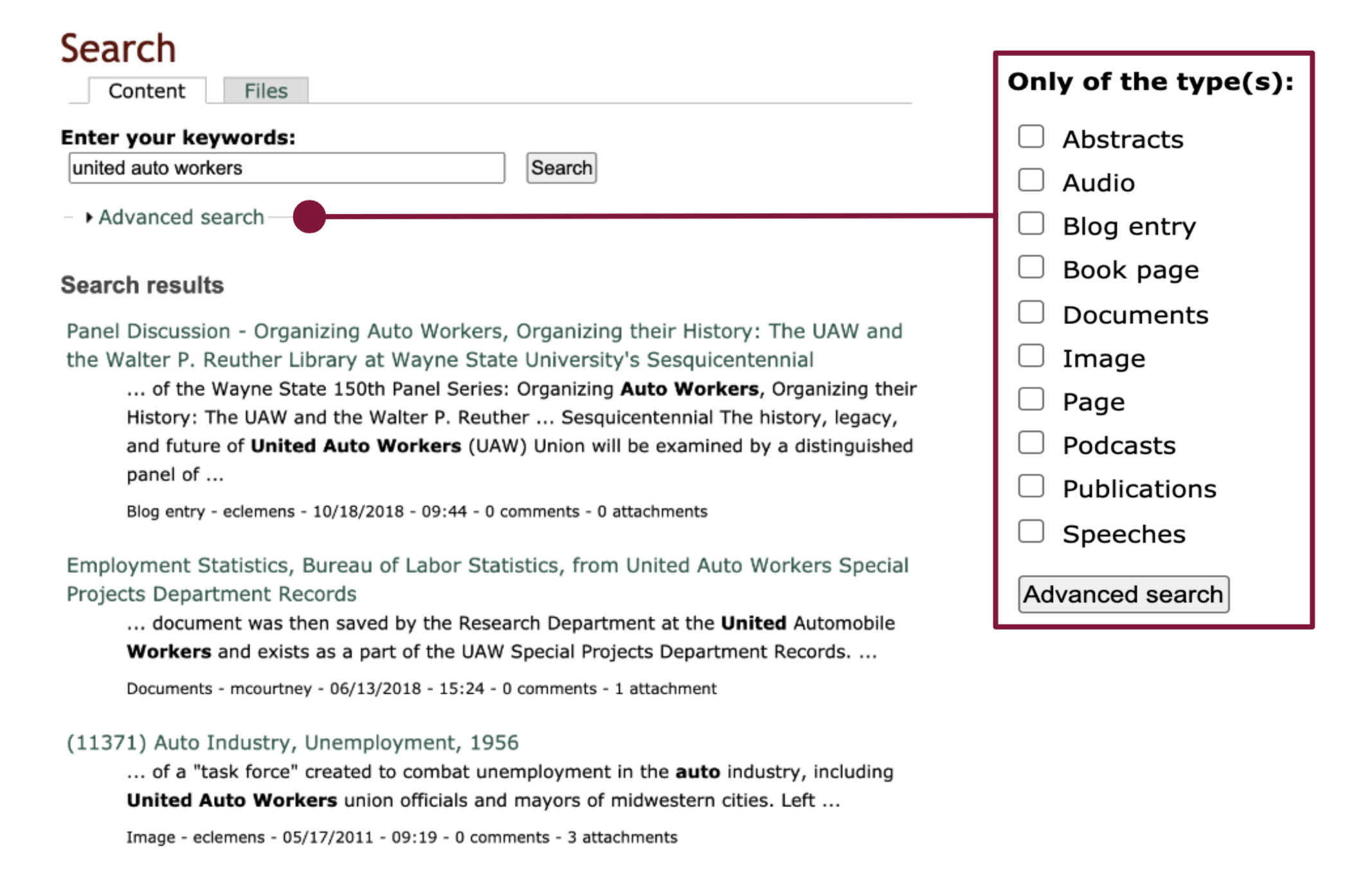
When reviewing the current system, we did notice a good starting point: the advanced search feature allowing users to filter by “type(s)”. We utilized this when developing the new bento system, using the existing filters to organize content.
Finding a Solution
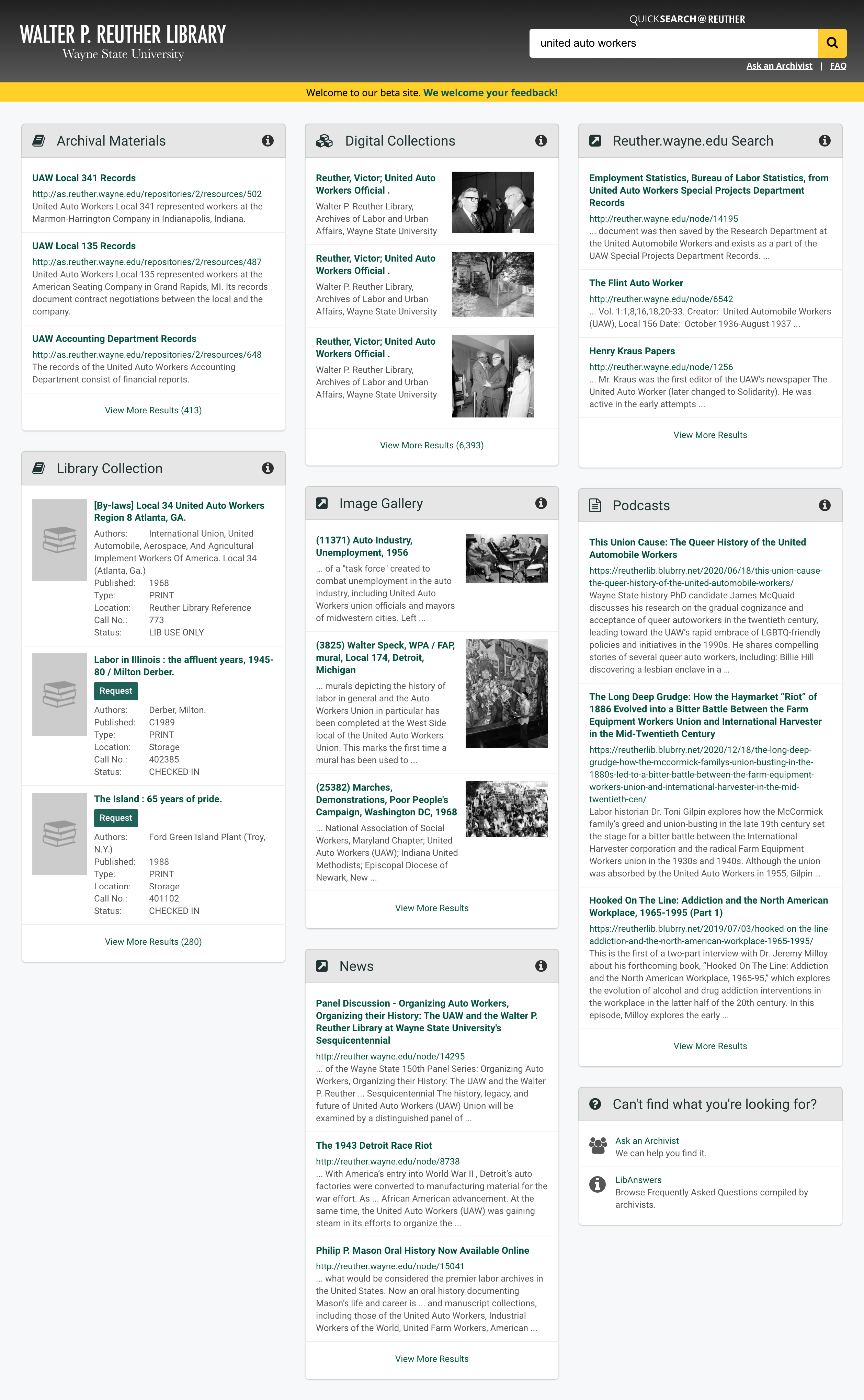
Our solution is QuickSearch@Reuther, modeled after our in-house discovery tool QuickSearch. Aiming to increase the visibility of archival material within the broader library ecosystem, QuickSearch@Reuther is a single search box that uses custom code to send queries to multiple disparate systems.

Our Process
Guided by the existing QuickSearch model, we communicated with Reuther stakeholders and determined box content scope and placement. We first integrated results from ArchivesSpace, as the legacy site search only retrieves PDF finding aids. We also added results from other outside systems that we believed users are interested in using.
We organized all Reuther content into the following categories:
- Archival Materials: Results are pulled from ArchivesSpace (archives.wayne.edu), which contains finding aids. Screen scraping is employed, as the ArchivesSpace API wasn’t harnessable in this way.
- Digital Collections: Results are pulled from digital.library.wayne.edu, a repository of institutionally relevant text, images, and audiovisual material from a variety of sources. Like the Image Gallery box below, the results add welcome visual context for users.
- Reuther.wayne.edu Search, Image Gallery, and News: These boxes display different types defined in the legacy system’s advanced search module. Image Gallery retrieves results of the image type; News retrieves those of the blog entry type; Reuther.wayne.edu captures the remaining types.
- Library Collection: This box integrates the library catalog (elibrary.wayne.edu), but with the location set to “Reuther Library.” User can request items from the results page, without going to the detailed catalog records. This was an important step in connecting relevant non-manuscript items to the rest of the archive.
- Podcasts: Results are pulled from reutherlib.blubrry.net, where “Tales from the Reuther Library” is hosted. On the legacy site, the search module doesn’t integrate with the podcast hosting platform.
- Can’t find what you’re looking for?: We added this box to direct users to “Ask an Archivist” and the Reuther’s LibAnswers FAQ, helpful resources missing from the legacy site.
Takeaways
My team launched Quicksearch@Reuther right around the time campus shut down for COVID-19. It couldn’t have had a more timely debut. Researchers had long relied on in-person sessions in the Reuther’s reading room, and with COVID-19 restrictions that was no longer possible. Quicksearch@Reuther not only made previously siloed material discoverable, but allowed for researchers to explore available collections even when the physical archive was closed to the public.